


A customer gets a text that says, “Your order has shipped.” It has a long link and no brand name. There is no way to ask a question. If the delivery is late, they call your support line.
RCS Business Messaging in India offers a different experience. The same update can arrive with your logo, a product image, and a “Track order” button, right inside the phone’s default messaging app. This guide explains how Google RCS Messaging works for businesses, where it fits, what implementation involves, and what to check before you choose a provider.
What Is Google RCS Messaging?
RCS stands for Rich Communication Services. Google describes it as a modern messaging standard that supports more dynamic, interactive, and secure conversations than SMS and MMS.
Ordinary RCS chats are messages between friends. RCS for Business is different. It is built for companies to send branded, interactive messages for marketing, support, and sales. It also lets customers start a conversation. Google says brands can add a message button to listings on Google Search, Google Maps, and other Google surfaces, where available.
For a feature-by-feature overview, read Mishtel’s guide to Google RCS Messaging for business. This article focuses on using RCS in India.
How RCS Business Messaging Works in India
Businesses do not send RCS messages straight from Google. Google says they work with a partner or messaging aggregator that connects to carriers. The usual path looks like this:
- Set up a business agent. This is your sender profile, with a name, logo, and details.
- Get verified and approved. Verification and carrier approvals are part of onboarding. Timelines differ.
- Check the recipient. The platform checks whether the customer’s phone and network can receive RCS.
- Send the message. Compatible users see the rich message. Others may get a fallback such as SMS, where supported.
- Handle replies. Customers tap buttons or reply, and your system or team responds.
Key Features That Matter for Business Conversations
Features can vary by device, carrier, and provider. The ones that matter most for conversations are:
- Verified branding: Your name and logo help customers recognise the sender, where supported.
- Rich cards and carousels: An image with text and buttons, or a row of scrollable cards.
- Suggested replies and action buttons: Customers tap “Confirm” or “Call us” instead of typing.
- Two-way chat: Customers can reply, and your team can respond.
- Read receipts and analytics, where supported: These show what happened after you sent a message.
RCS vs SMS for Businesses
| Area | SMS | RCS |
| Format | Plain text, short | Text, images, video, cards, and carousels |
| Sender identity | A sender ID or number | Verified name and logo, where supported |
| Interaction | Mostly one-way | Buttons, suggested replies, and two-way chat |
| Compatibility | Almost every phone | Needs a compatible device, app, and carrier |
| Best for | OTPs, short alerts, wide reach | Guided updates, bookings, and rich product messages |
SMS reaches almost any phone. RCS offers more on compatible devices. Many businesses use RCS where it is available and keep SMS as the base layer through a bulk SMS service.
RCS vs WhatsApp Business
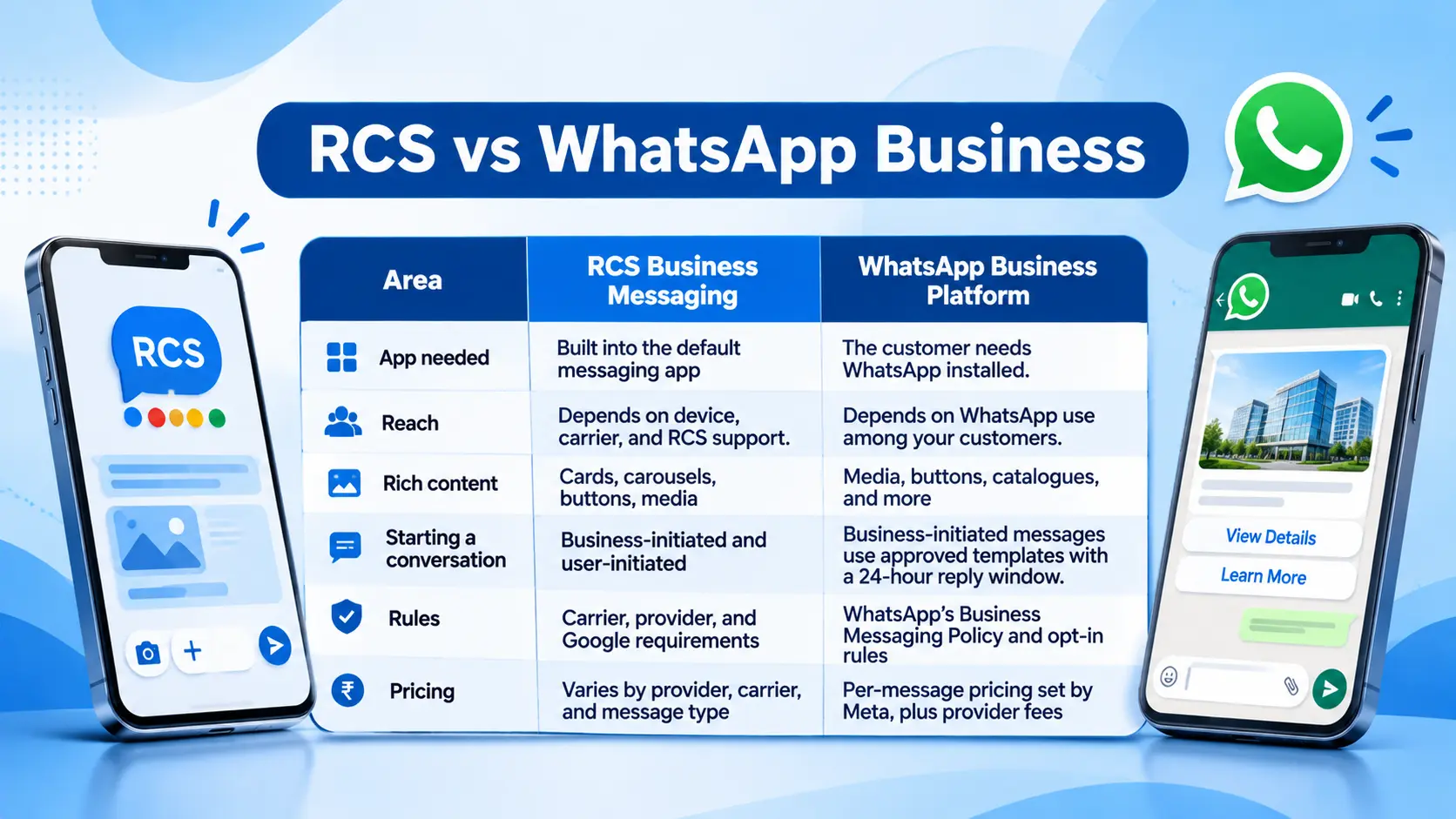
The two solve similar problems in different ways. WhatsApp works well where customers already chat. RCS reaches people in their default inbox without an extra app. If you want to compare WhatsApp in more depth, read Mishtel’s article on the WhatsApp Business API.
Practical RCS Use Cases for Indian Businesses
The strongest RCS messages guide a customer to a next step. Here is how common uses can look as short conversations.
E-commerce order updates. A card shows the product image and delivery date, with a “Track order” button. A “Need help?” reply opens a support chat. A person takes over for damaged or missing items.
Appointment reminders. A clinic sends a card with the date and time, plus “Confirm” and “Reschedule” buttons. This saves phone calls. Keep health details out of the message.
Banking and financial service updates. A bank sends a service notice with a button to open its app or website. Do not ask customers to share card or account numbers in the chat, and follow your sector’s rules.
Education enquiries. A college sends admission dates with a “Book a counselling slot” button.
Travel and hospitality. A hotel sends check-in details with a map button and a “Contact us” reply.
Customer support. A suggested reply menu (“Track order”, “Return item”, “Talk to us “) gives quick paths. When a customer needs to speak to someone, an IVR Service or a cloud call center can take over the call.
Marketing. A carousel shows three products with “View” buttons. Send these only to people who have agreed to receive offers.
Not every message should be promotional, and not every use case needs RCS. Wondering whether RCS suits your customer communication? You can explore RCS for your business and see what a typical setup looks like.
RCS Availability and Compatibility in India
Google says RCS is available on Android and iOS devices where carriers support it. Reports indicate that Jio, Airtel, and Vi support RCS business messaging in India. They also indicate that Jio extended commercial RCS business messaging to iPhones in September 2026. Support, features, and pricing can differ by operator and device, and they can change. Check Google’s carrier information and ask your provider for current coverage.
Not every customer will be able to receive RCS. A phone may be older, a setting may be off, or the carrier may not support it. Plan for these customers with a fallback.
What Does Implementation Involve?
Most projects follow these steps:
- Choose a use case. Start with one clear job, such as delivery updates or appointment reminders.
- Pick a provider. Google says businesses use a partner or aggregator.
- Prepare business details. You will need your brand name, logo, and verification information.
- Build your message templates. Plan images, text, and buttons. Keep them short.
- Get approvals. The provider handles verification and carrier approvals, and some message types may need template approval.
- Connect your systems. An API can link RCS to your CRM or order system.
- Test. Send messages to internal devices on different phones and networks.
- Launch small and review. Check delivery data and replies before you scale up.
On the technical side, ask your provider what you need for API access. Ask how replies reach your team and which media sizes and formats are supported. Google notes that limits such as file size, character counts, and carousel card counts vary by platform and carrier.
Limitations and Fallback Options
RCS has limits, and it is better to know them early:
- Reach is not universal. It depends on the device, app, and carrier.
- Features vary. A card that looks right on one phone may look different on another.
- Approvals take time. Verification and carrier steps add to your schedule.
- Rules are still being clarified. Sources disagree on how India’s DLT framework applies to RCS. Ask your provider in writing which registrations your use case needs, and check TRAI’s current directions.
A fallback keeps important messages from being lost. Ask whether your provider can fall back to SMS or another channel, what it costs, and how it is reported. Keep SMS ready for OTPs and urgent alerts.
RCS Pricing Considerations
Google says costs vary by aggregator and carrier and are usually based on message volume, message type, and location. In practice, ask about:
- The price for each message type (marketing, transactional, authentication, and support)
- Whether rich messages cost more than text-only messages
- Setup, verification, or platform fees
- The cost of fallback messages
- Minimum commitments or billing terms
Ask for a written quotation based on your own volume. Do not rely on rates you read elsewhere, because they change.
What to Check Before Choosing an RCS Messaging Service Provider
- Onboarding and verification support: What do they need from you, and how long does it usually take?
- Carrier coverage: Which operators and devices can your messages reach?
- Fallback options: What happens when RCS is not available?
- Message categories: Are marketing, transactional, authentication, and support messages supported?
- Message tools: Can you build cards, carousels, and buttons easily?
- Two-way messaging: Can replies reach your team or CRM?
- Reporting: What data do you see on delivery and engagement?
- Pricing: Is it clear and written down?
- Compliance guidance: How does the provider handle consent, templates, and telecom rules?
- Support: Who helps when a campaign has a problem?
Ready to compare options? Share your use case and expected volume with Mishtel to discuss your RCS messaging requirements.
How Mishtel Can Help with RCS Business Messaging in India
Mishtel is an Indian business communication and cloud telephony provider. According to its Google RCS service page, the service covers rich messages with images, videos, and carousels. It also lists call-to-action buttons, a verified brand profile, and two-way conversations. The page mentions help with campaign setup, template approval, API integration, and technical support.
Many businesses pair RCS with other channels. Mishtel also offers bulk SMS as a fallback and for short alerts, and WhatsApp Business for customers who prefer to chat there. The right mix depends on your audience and use case.
Conclusion
RCS Business Messaging in India can help businesses turn one-way notices into short, useful conversations. Google RCS Messaging works best when you start with one clear use case. Plan for customers who cannot receive RCS, and check pricing, approvals, and rules before you launch.
SMS sends plain text to almost any phone. RCS adds branding, rich media, and buttons but works only on compatible devices and networks. No. Google says RCS is available on Android and iOS where carriers support it. Features vary by device and operator. Yes. Google says businesses use a partner or aggregator to connect with carriers. Ask about onboarding, coverage, and fallback. Yes. Google lists marketing and promotions as a message category. Send only to people who agreed to receive them, and check provider and telecom requirements. Many providers can fall back to SMS or another channel. Confirm whether this is available, how it works, and what it costs. Costs vary by aggregator and carrier. They usually depend on message volume, type, and location. Ask for a written quotation.
How is RCS different from SMS?
Does RCS work on every phone?
Do I need a provider to send RCS messages?
Can I send marketing messages through RCS?
What happens if a customer cannot receive RCS?
How much does RCS messaging cost?