
A visitor spends five minutes on your pricing page. They have one question about delivery times. There is no phone number in sight, and the contact form promises a reply “within one working day”. By then, they have already messaged two other suppliers.
A click-to-call button removes that gap. But the button is the easy part. What happens after the click depends on your provider: how the call is connected, who answers it, what gets recorded, and what the call costs. This guide focuses on choosing a click-to-call service provider, not on repeating what the feature is. If you want the basics first, read Mishtel’s article on how click to call works.
What Is a Click-to-Call Service and How Does It Work?
A click-to-call service lets a person start a phone call by clicking a button on a website, app, or CRM screen. They do not dial a number.
Behind the button, a cloud telephony click-to-call platform does the work:
- A visitor clicks the button or enters their number.
- The request goes to the telephony platform, often through an API.
- The platform places the call. It may ring the agent first or ring the customer first.
- When both sides answer, the platform connects them.
- The call details are logged for reports.
Providers connect the call in different ways, and that choice affects cost and customer experience. We cover it below.
Why Businesses Need a Reliable Click-to-Call Service Provider
A weak setup can leave a request unanswered or ring the wrong team. A reliable provider helps you:
- Connect website visitors with sales teams: A prospect can reach someone while interest is fresh.
- Handle product and service enquiries: Questions get answered in a conversation, not a thread of emails.
- Make support easier to reach: Customers do not need to look up a number.
- Manage inbound and outbound calls: The same platform can serve both.
- Support follow-ups: A click-to-call system for sales teams lets agents call leads straight from a CRM screen.
- Reduce friction: Fewer steps stand between a question and an answer.
These are possible benefits. No provider can guarantee leads, conversions, or sales.
Two Kinds of Click-to-Call You Should Not Mix Up
Providers use the term for two different jobs:
- Click-to-call for website visitors. A customer clicks a button or enters their number, and your team calls them back or takes the call.
- Click-to-dial for agents. A sales or support agent clicks a phone number in a CRM or dashboard, and the system places the call.
Many businesses need both. Be clear about which one you are buying, because the features, pricing, and consent needs differ.
Important Features to Check Before Choosing a Click-to-Call Provider
- Easy website integration: Can you add it with a code snippet, or does it need a developer?
- Buttons and widgets: Can you style them, place them on selected pages, and show them at set times?
- API integration: Is there documentation, and who helps with setup?
- CRM integration: Which systems connect, and how does call data move?
- Call routing and forwarding: Can calls go to the right team by time or location?
- Agent availability and call distribution: What happens when agents are busy or offline?
- Call recording: Is it available, and how do you handle consent and storage?
- Call reports and analytics: Can you see calls by page, campaign, or agent?
- Real-time monitoring: Can a manager watch live activity?
- Scalability: Can it handle more agents and calls later?
- Security and access controls: Who can see numbers and recordings?
- Technical support: Who helps when a call fails?
Why API and CRM Integration Matter in Click-to-Call Solutions
An API is a way for two systems to talk to each other. With click-to-call API integration, your website or app can ask the telephony platform to place a call without anyone touching a phone.
Integration matters because:
- Website click-to-call integration can pass useful details, such as the page the visitor was on, to your agent.
- CRM click-to-call integration lets agents call from a contact record and can save call details back to it.
- Call information helps the next agent follow up without asking the same questions.
Before you commit, ask:
- Does the provider publish API documentation, and can I see it?
- Does it work with the CRM I already use, or will it need custom work?
- Who builds and maintains the integration?
- How are failed calls and errors reported?
- Is there a test environment?
Do not assume compatibility with a particular CRM. Ask the provider to confirm it for your system.
How the Call Is Connected and Why It Affects Cost
Ask each provider how the call is set up:
- Callback to the customer: The platform rings the customer, then connects an agent.
- Agent first: The platform rings the agent, then the customer.
- App or browser calling: The agent takes the call through an internet connection.
Each model has different effects. A call that rings two phones may involve two legs of calling, and some providers bill each leg. Ask what the quoted rate covers. Also ask which number the customer sees on their screen, since a familiar number is more likely to be answered.
Consent matters too. If a customer enters their number to request a call, keep a record of that request. Check the telecom rules for your call type, and tell customers if calls are recorded.
How to Evaluate Click-to-Call Pricing
Prices vary, and online listings use different units (per month, per hour, per minute). Factors that affect cost include:
- Number of users or agents
- Call volume and duration
- Telephony usage charges
- Platform or subscription fees
- API integration requirements
- CRM integration and customisation
- Additional features: recording, reports, IVR
- Support and maintenance
Mishtel’s pricing page lists Click 2 Call at ₹0.24 per minute, as shown on 17 November 2026. The page does not say whether that is per-call leg or per-call, or whether taxes and platform fees apply. Ask Mishtel to confirm, and check the pricing page for current rates. For a plan based on your own agents and volume, request a customised quotation.
Looking for a click-to-call solution for business use? Share your website, CRM, agent count, and expected call volume with Mishtel to discuss a Click-to-Call service that fits.
How to Compare Different Click-to-Call Service Providers
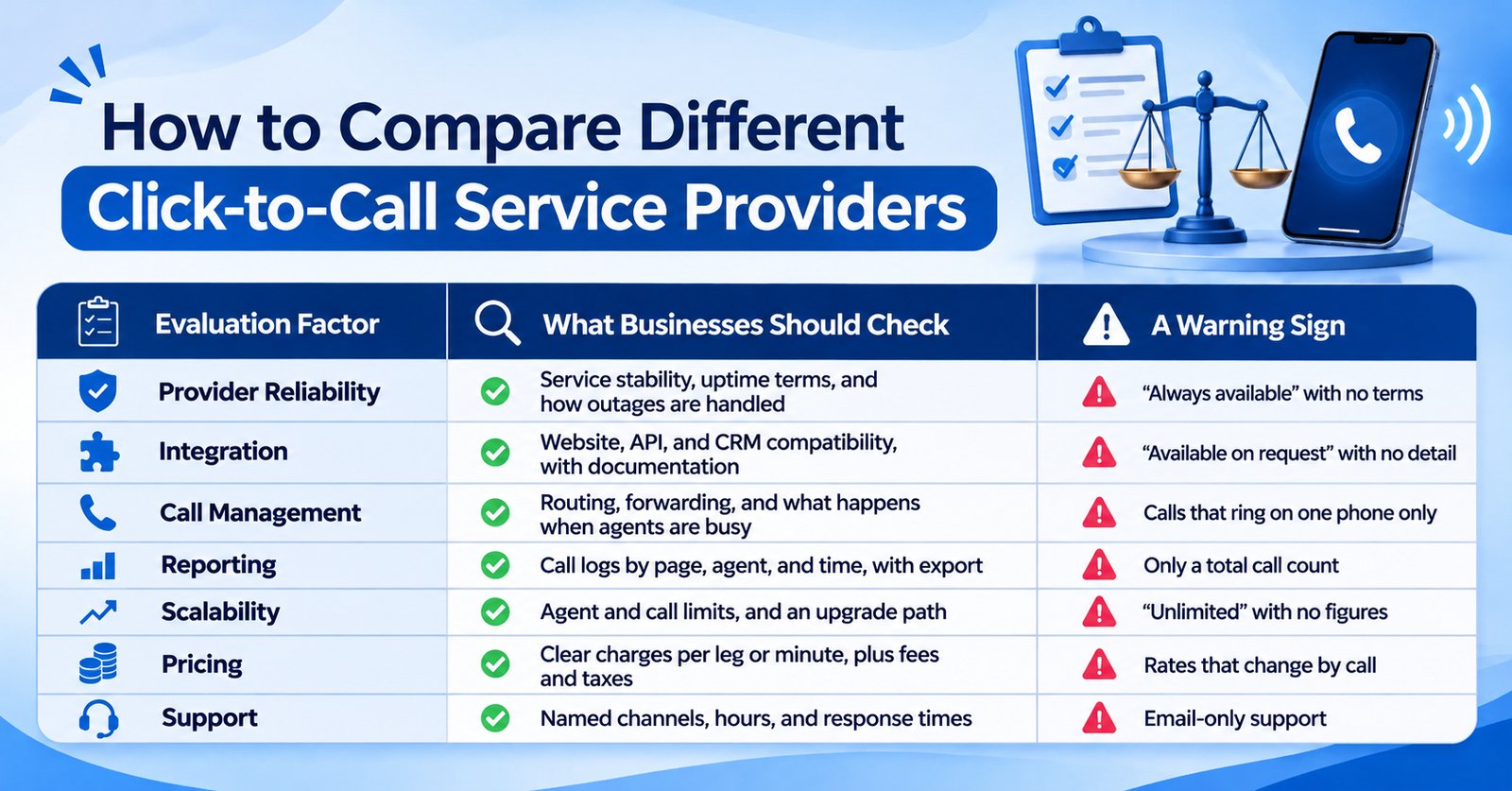
Do not choose by the longest feature list. Choose the provider whose answers best fit your workflow.
Industries That Can Use Click-to-Call Solutions
- E-commerce and retail: A shopper clicks to ask about stock or delivery before buying.
- Real estate: A buyer on a project page asks for a site visit and gets a call back.
- Education: A parent asks about admission dates from the course page.
- Healthcare: A patient requests an appointment call. Keep medical details out of recordings and messages where possible.
- Banking and financial services: A customer asks about a loan or service. Do not collect card details on a call.
- Travel and hospitality: A traveller changes a booking by clicking from a confirmation email.
- IT and professional services: A prospect asks for a quote from a services page.
- Customer support and sales teams: Agents click numbers in a CRM and save dialling time.
Each case needs a clear call owner, so requests don’t go unanswered.
Questions to Ask Before Selecting a Click-to-Call Service Provider
- Can the solution integrate with my website?
- Does the provider offer API integration, with documentation?
- Can it connect with my existing CRM?
- Are call reports and analytics available?
- Can calls be routed to different agents?
- What pricing model does the provider follow, and does it bill per call leg?
- What technical support is available?
- Can the solution scale as my business grows?
Add these as well: Which number do customers see? How are recordings stored? Can I run a short trial first?
Why Consider Mishtel Services for Click-to-Call Solutions
Mishtel is an Indian provider of cloud telephony and business calling solutions. It lists Click2Call among its cloud telephony services, alongside an IVR Service, a cloud call center, and a toll-free number service. Its political campaigns page describes click-to-call as a way to connect website visitors directly to campaign representatives, which shows the basic website-to-agent flow. Its pricing page lists the Click 2 Call rate mentioned above.
Because each business sets this up differently, ask Mishtel to explain how the service would work for you. Useful questions are:
- How is the call connected, and what does the customer see?
- Is API documentation available, and what does integration involve?
- Which CRM systems can connect, and how?
- How are calls routed, and what reports do I get?
- Is call recording available, and how is it stored?
- What support is available during setup and live use?
[VERIFY BEFORE PUBLISHING: confirm Click-to-Call features, API and CRM options, routing, recording, and reports on Mishtel’s Click-to-Call page, and add them here.]
The Mishtel team can discuss your requirements and suggest the right setup.
Conclusion
The best click-to-call service provider is the one that fits your website, your team, and your call flow. Check how the call is connected, how it integrates with your CRM, what it reports, and exactly what each call costs. Test with a trial before you commit.
Looking for a click-to-call solution for your business? Contact Mishtel Services to discuss your requirements and explore a setup that fits.
How do I choose the best Click-to-Call service provider?
Compare integration, API and CRM support, routing, reports, the call-connection model, pricing clarity, scalability, and support. Run a trial with your own website and agents.
Can Click-to-Call be integrated into a business website?
Yes. Providers usually offer a code snippet or API. Ask about button styling, page-level control, and what visitor details reach the agent.
What is Click-to-Call API integration?
An API lets your website or software ask the telephony platform to place a call automatically. Ask for documentation, error handling, and setup support.
Can Click-to-Call software integrate with CRM systems?
Often, but not always. Ask which CRMs are supported and how call data is saved. Do not assume compatibility with your system.
Is Click-to-Call useful for sales teams?
It can save dialling time and let teams call leads quickly from a CRM. Results depend on how fast agents respond, so it does not guarantee sales.
How much does Click-to-Call software cost?
Costs depend on agents, call minutes, features, and integration. Mishtel's pricing page lists a per-minute rate. Ask whether it applies per leg and about taxes.
What features should businesses compare before selecting a Click-to-Call provider?
Compare website and CRM integration, API, routing, recording, reports, monitoring, security, scalability, and support. Also compare how calls are billed.